System Map: How All Production Pages Are Connected
An overview of the "Production" vertical from customer request to finished product: six stages, which pages are responsible for each, and where to find the necessary instructions.
The "Production" section contains several dozen pages. If you open them at random, it's easy to get lost. If you know how they are connected, everything falls into place: each page is responsible for one step on the path from customer request to finished product.
This article is a map. It doesn't explain every button, but shows the big picture and leads to detailed instructions.
The Journey of One Order
Imagine a customer sent a photo of a shelf and asked for twenty more. Here's what happens next.
- Sales. The manager creates a request, the system estimates the cost, the customer receives an offer.
- Engineering. The product is precisely described: model, parts, specification.
- Technology. For each type of part, there's a routing: which operations and in what order.
- Planning. Orders are launched, broken down into units, and cutting and materials are planned.
- Shop Floor. The foreman assigns work, operators perform operations.
- Control. Quality is checked, and the results of people and machines are measured.
Each stage builds on the previous one. You cannot plan something for which there is no routing, and you cannot calculate the price of something that has not been described.
Stage 1. Sales and Pricing
Customer Requests — all inquiries on one screen, from new to transferred to production. Learn more.
Costing Studio — input data for pricing: materials, prices, operation times, rates. Learn more.
Manufacturing Advisor — explains the calculated cost and advises how to make it cheaper. Learn more.
Public Studio — the customer designs the product themselves on your website. Learn more.
Stage 2. Engineering
3D Import — you upload a model from the designer, the system breaks it down into parts. Learn more.
Drawing Recognition — the same, but from a photo of a drawing. Learn more.
Product Configurator — product families with parameters and rules, if you make variations of one product. Learn more.
Design Chats — designing a kitchen in conversation with an assistant. Learn more.
BOM Registry — what each product consists of. Learn more.
Manufacturing Drawings — drawings built from the model. Learn more.
Stage 3. Technology
Routings — through which operations each type of part passes. Learn more.
Nesting — arranging parts on a sheet and tube. Learn more.
Bending Operator Center — sequence of bends. Learn more.
Robotic Cells — welding robot controlled by the system. Learn more.
Blends and Packaging — for productions that mix and package. Learn more.
Stage 4. Planning
Production Orders — list of orders, readiness, launch. Learn more.
Production Board — all orders together: stages, deadlines, Gantt, load. Learn more.
APS Planning — automatic scheduling of operations by capacity. Learn more.
Material Flow — need, reserve, shortage. Learn more.
Stage 5. Shop Floor
Foreman Cockpit — one order completely, with a 3D map and all decisions. Learn more.
Work Dispatch — who is doing what now and who to give the next task to. Learn more.
Shop Tasks — cleaning, material, assistance, and other off-route work. Learn more.
Operator View — screen for the person at the machine. Learn more.
Cutting Receipt — report from the cutting operator. Learn more.
Production Units — where each part is currently. Learn more.
Stage 6. Control
Plant Live — who is at work and which machines are operating. Learn more.
Factory Map — the same on the factory floor plan. Learn more.
Quality Management — inspections, defects, rework, scrap. Learn more.
People and Results — presence, productivity, training, bonuses. Learn more.
The Foundation Everything Stands On
There are pages that do not belong to any single stage because they are needed by everyone.
Factory Configuration — halls, people, rules, terminals. Learn more.
Shop Floor Workforce — skills and qualifications. Learn more.
Industry Packs — system settings for your industry. Learn more.
ERP Connectors — orders from the client's system. Learn more.
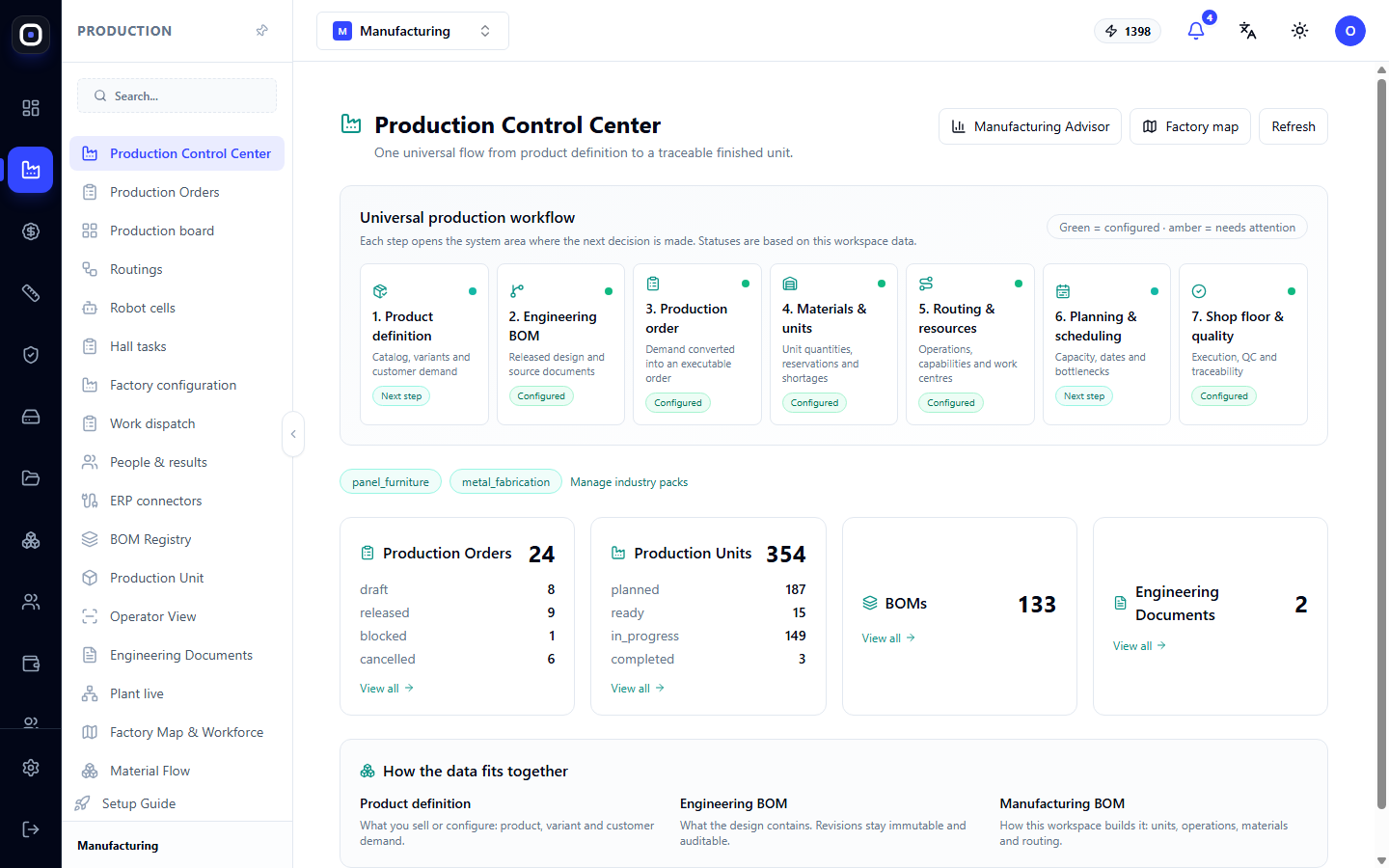
Production Control Center — starting page with hints about what's missing. Learn more.
In What Order to Set Up
A new factory doesn't need to open everything at once. Here's a working order.
- Industry Packs. Enable yours and fill in initial data.
- Factory Configuration. Describe halls, machines, people.
- Shop Floor Workforce. Record skills.
- Routings. Describe how you make each type of part.
- Costing Studio. Enter material prices and rates.
- First Product. Upload the model via 3D Import.
- First Order. Launch it and follow the path to completion.
Seven cards in the Production Control Center show which of these steps have already been completed.
Who Uses Which Pages
- Owner and Manager — Production Control Center, Production Board, Plant Live, People and Results, Manufacturing Advisor.
- Sales Manager — Customer Requests, Costing Studio, Public Studio.
- Designer and Technologist — 3D Import, Configurator, Routings, Nesting, Drawings.
- Planner — Production Orders, Production Board, APS Planning, Material Flow.
- Foreman — Foreman Cockpit, Work Dispatch, Shop Tasks.
- Operator — Operator View, Cutting Receipt, Bending Operator Center.
- Quality Controller — Quality Management.