Drawing Templates
A drawing template defines the appearance of the title block, branding, and standard notes on every automatically generated drawing — configured once for the entire workspace.
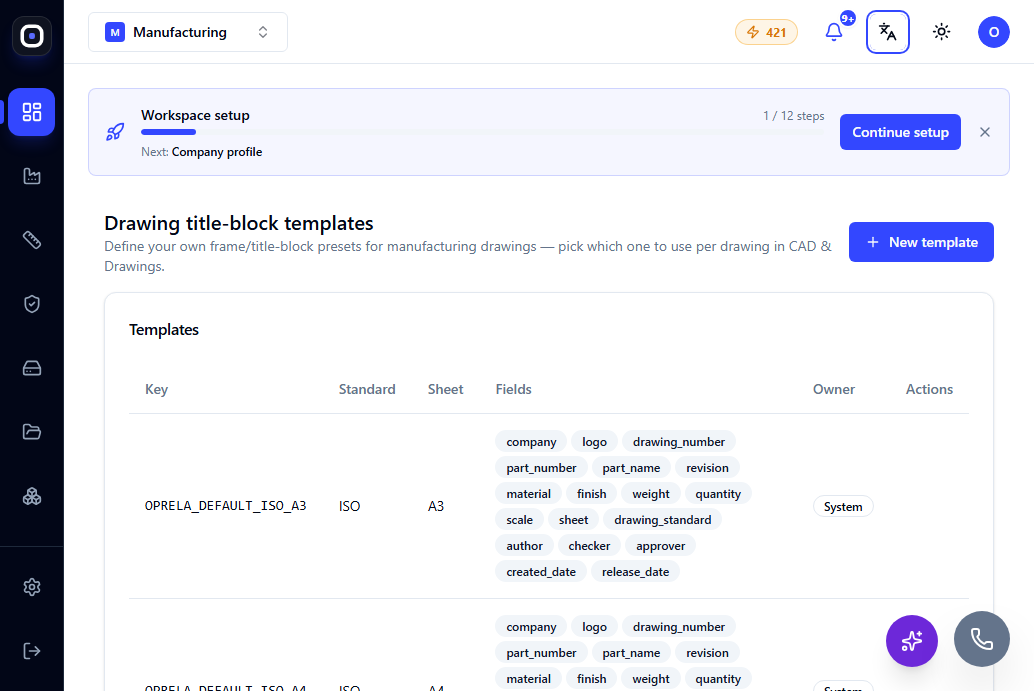
Page: /erp/drawing-templates
The Manufacturing Drawing Engine (see Manufacturing Drawings) automatically generates the geometric part of the drawing — but the layout (title block, company logo, standard notes, signature fields) is defined separately by a template.
What's Included in a Template
- Title block — company name, drawing number, revision, date, scale, signature fields.
- Branding — company logo and corporate colors.
- Standard notes — typical text annotations that should appear on every drawing (e.g., general default tolerances, material designation).
One Template — Consistent Look for All Drawings
Since the template is applied centrally, any drawing generated by any engineer in the workspace will have a consistent, recognizable appearance — regardless of who created it or when. This is especially important when drawings are provided to a client or subcontractor as an official document.
Multiple Templates
A workspace can have multiple templates (e.g., one for internal manufacturing use and a separate, more formal one for client-facing documents), and a specific template is chosen during drawing generation.
Connection to Numbering
The format of the drawing number in the title block is consistent with the overall numbering system of the workspace — see Numbering and Identifiers.